Biltum vs RENDR
Measurements alone don’t make a budget.
RENDR sends measurements to JobTread, where your template formulas turn them into quantities.1 Biltum records the homeowner conversation, then captures photos, video, narration and LiDAR at the same time in one Job Scan. That’s how it writes the whole budget into JobTread.
01
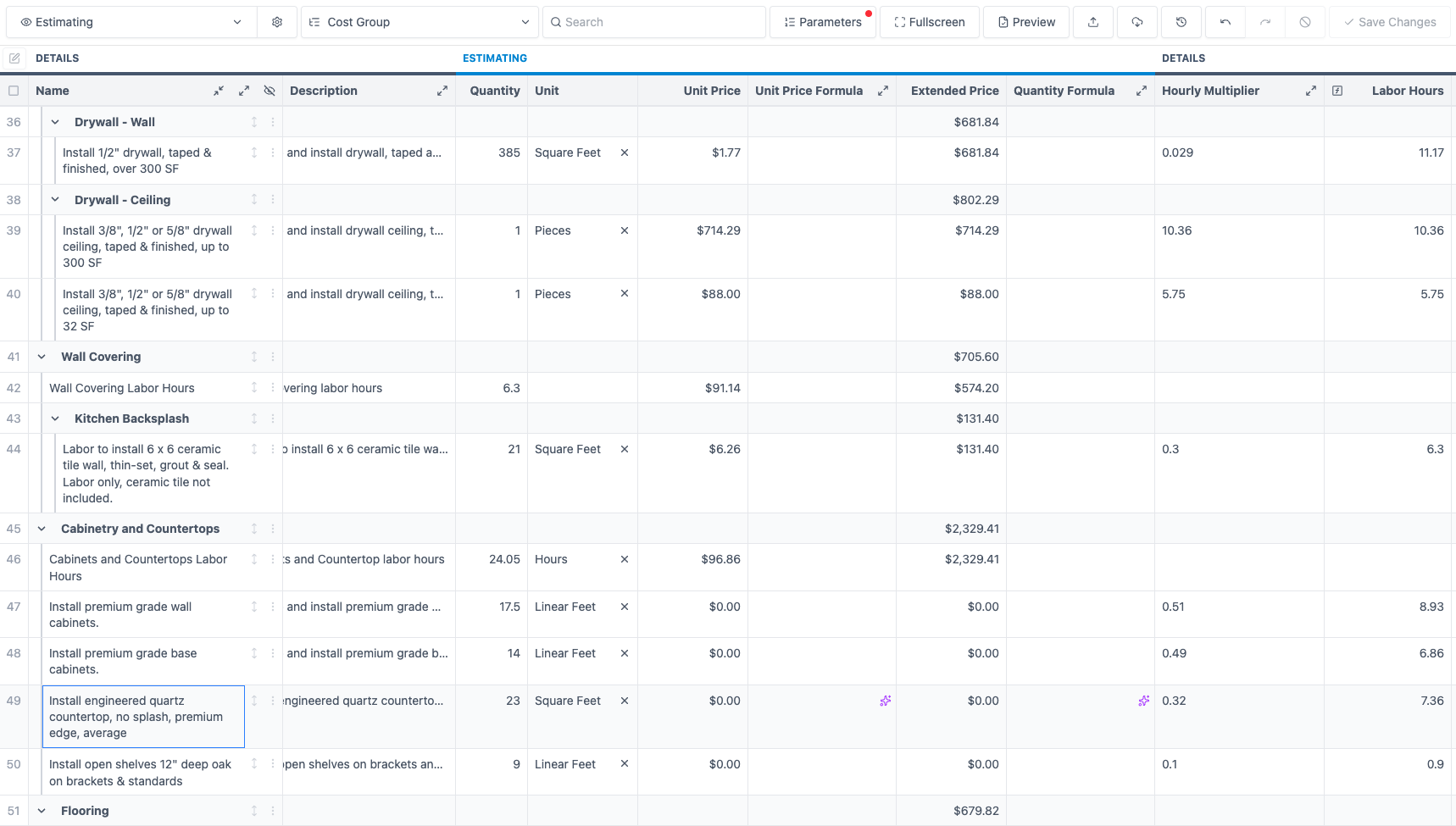
Biltum wrote this entire budget.
Not just measurements and quantities.
Key
- Orange outline: what Biltum wrote. The whole budget.
- Blue squares: what RENDR fills in from the scan. Quantities, through your templates.1

-
Their cost groups. Drywall - Wall, Drywall - Ceiling, and Kitchen Backsplash nested under Wall Covering.
-
Their catalog items. Premium grade wall and base cabinets, engineered quartz countertop, open oak shelves.
-
Measurements from the scan. 17.5 LF of wall cabinets, 14 LF of base cabinets, 23 SF of quartz.
-
Their custom columns. Hourly Multiplier turns linear feet into Labor Hours: 17.5 LF × 0.51 = 8.93 hours.
02
Biltum vs RENDR at a glance
| Feature |  | RENDR |
|---|---|---|
| Price | $58/month per company, first 3 jobs free3 | $149/month per seat, 14-day free trial4,5 |
| Setup time | None. Ready when you connect JobTread | Templates may take about 1–2 weeks6 |
| Budget comes from | Homeowner conversation, LiDAR scan measurements, video, photos and your catalog | Scan measurements and your templates1 |
| Cost groups and work items | Written for each job | You build them into templates1 |
| Quantities | Through your formulas1 | |
| Homeowner conversation transcript | In-app or imported | 7 |
| LiDAR measurements | 7 | |
| Video | Same time as LiDAR, photos and narration | 7 |
| Crew photo capture | Guest link | — |
| Chief Architect export (DXF) | 7 | |
| ProKitchen/ CabBuilder export (XML) | 7 | |
| PDF measurement report | 7 | |
| Estimating software | JobTread only | JobTread, Buildxact7 |
03
One visit. Every detail captured.
Everything you already do at the consultation, captured in one app. No juggling separate apps, so you save time on every visit.
1. Record the homeowner conversation
Transcribe it in Biltum, or import it from a supported transcription app.
2. Run one Job Scan
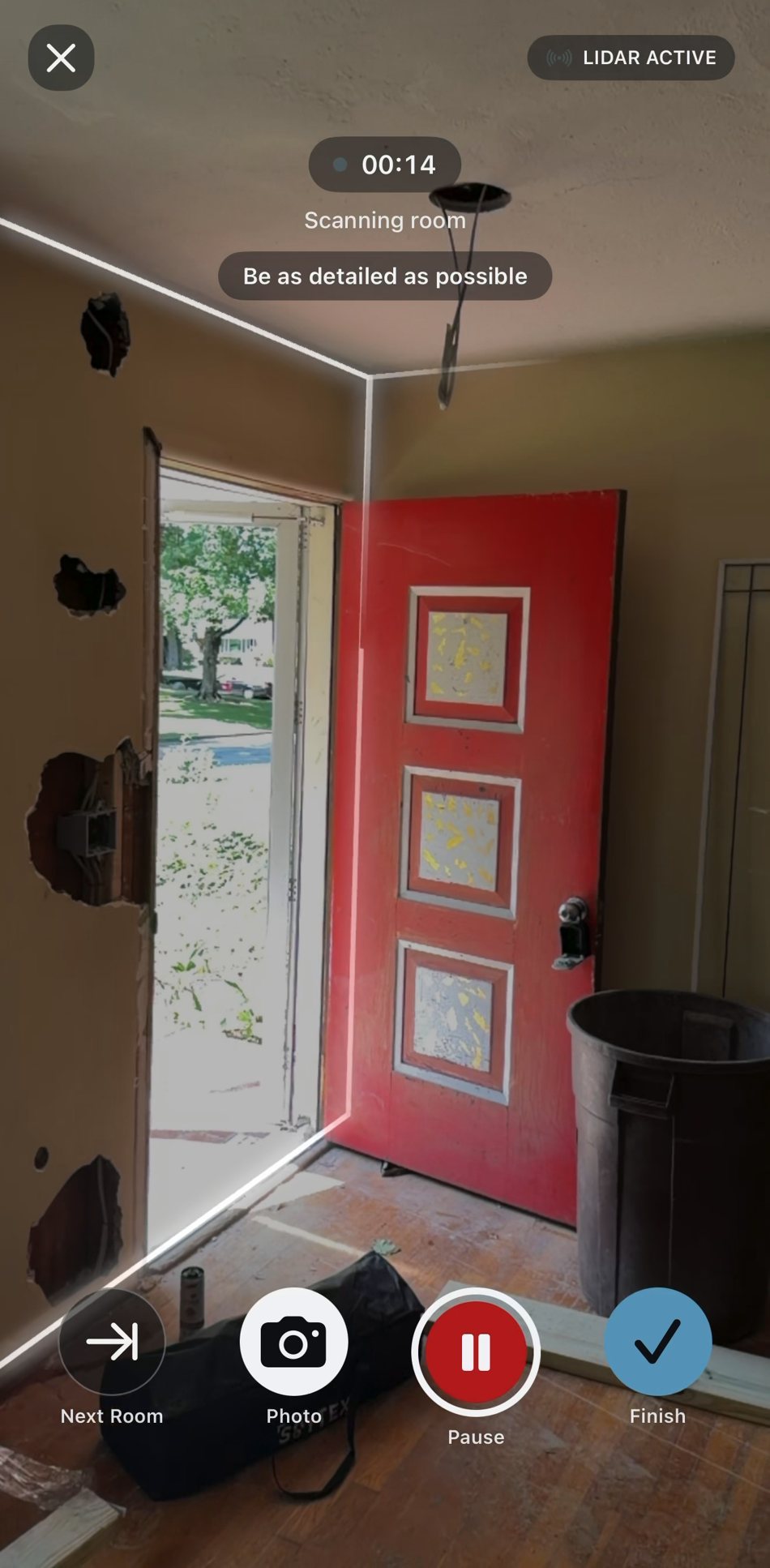
Photos, video, narration and LiDAR, all at the same time. Walk each room and explain the work in detail, like you’d brief your lead carpenter. Tips for scanning tricky rooms.
3. We write your budget into JobTread
Biltum packs the visit into Job Files, with your Estimating Playbook inside. Hand them to Claude or ChatGPT, connected to your JobTread, and it writes the budget into the job.
04
Budget Now, Design Ready When You Win
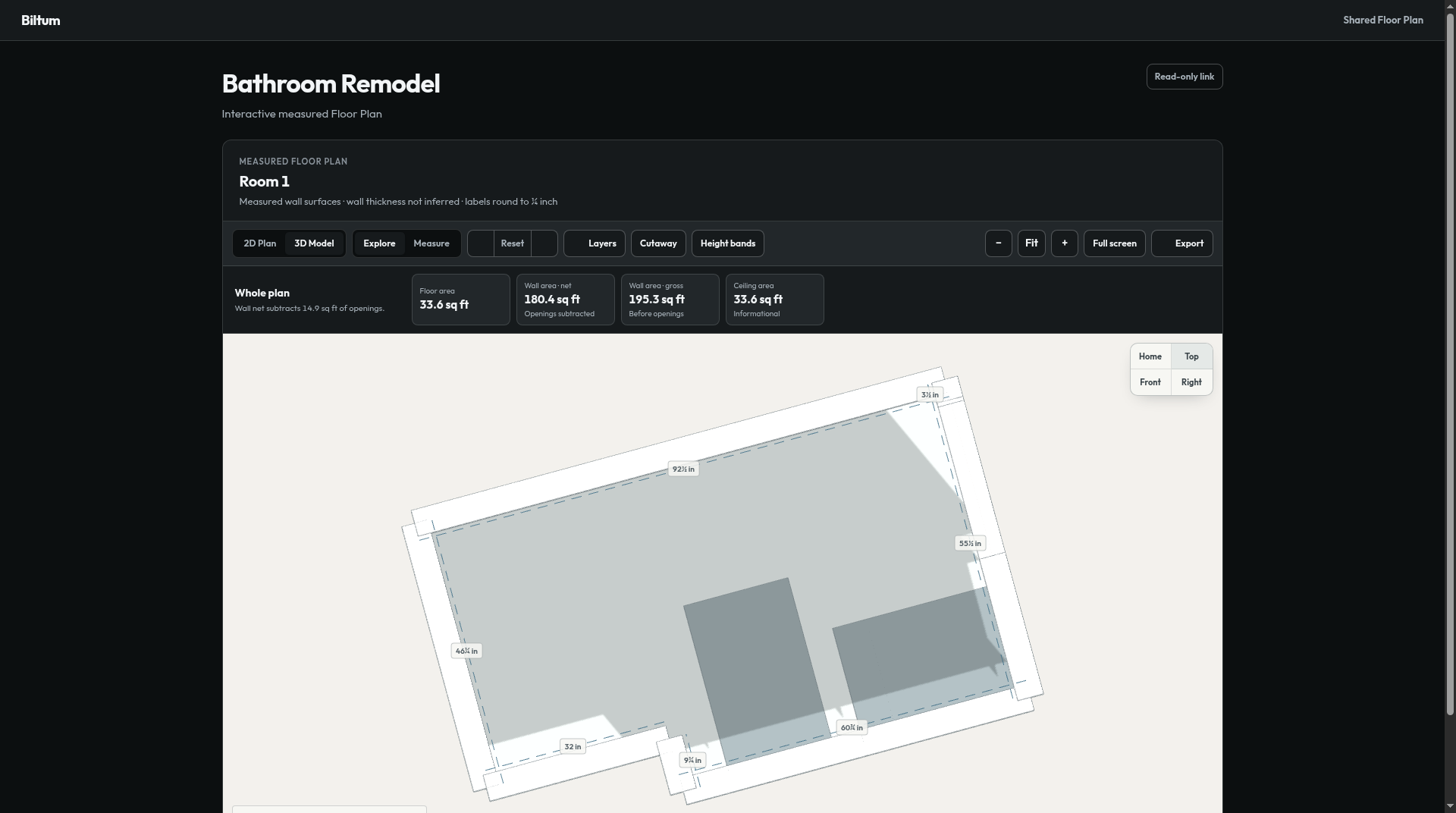
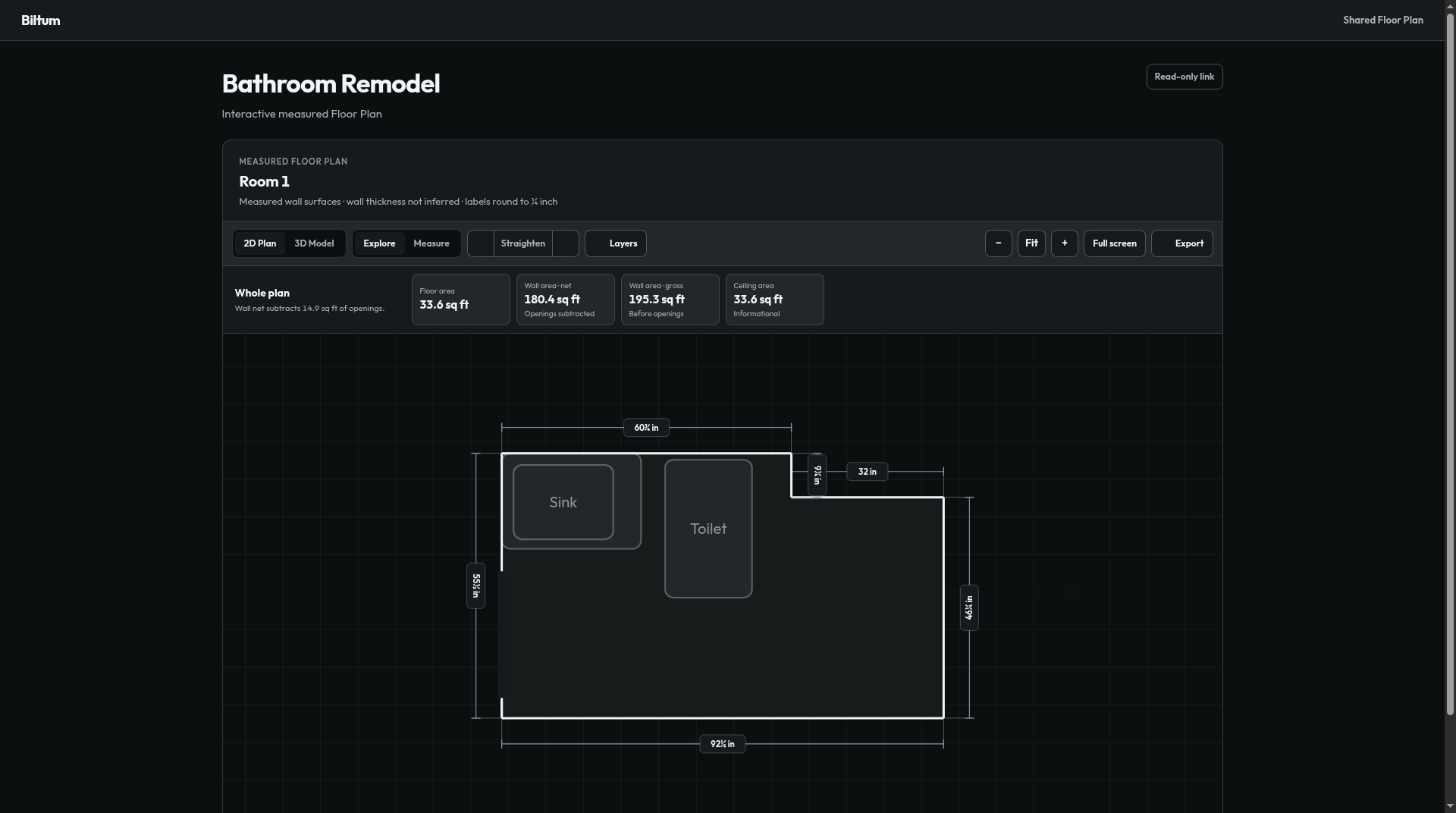
Biltum gets you the budget fast, and the same Job Scan is ready for design. Quick, easy exports into the CAD software you already use:
- DXF for Chief Architect with CAD to Walls and 2° Angle Correction
- XML for ProKitchen/ CabBuilder
- PDF measurement report
- 2D floor plan and 3D model. Also USDZ and SVG.
05
Every budget, written your way.
Company learning: the Estimating Playbook
Connect JobTread, and Biltum reads your past budgets, templates and catalog. It writes your Estimating Playbook, so every budget follows:
- Your cost groups and nesting
- Your catalog items, descriptions and units
- Your formulas, parameters, custom fields and selections
- Your catalog pricing, at current rates
That’s why the budget above is in MySquareHome’s own format. Nothing to set up. Templates made for RENDR work too.
Biltum flags unclear items, so you know where to look first.
06
When RENDR may be the better fit
- Homeowner scans. Invite to Capture sends homeowners a guided scan.7
- Plan editing. Flex Core, included in Pro, adjusts walls, windows and doors. Full Flex is an add-on.7 This matters if you must edit the plan onsite, rather than in your CAD software.
- Software beyond JobTread. RENDR works with Buildxact, Cabinet Vision and Design Flex.7 Biltum writes budgets in JobTread only.
07
Frequently asked questions
Does Biltum work without JobTread?
No. You sign in to Biltum with JobTread, and each Job Scan goes to a JobTread job. If you estimate in other software, Biltum isn’t an option.
How are Biltum and RENDR priced?
Biltum is $58/month per company, billed monthly, with your first 3 jobs free.3 RENDR Pro is $149/month billed monthly or $119/month billed annually, per seat, with a 14-day free trial.4,5,8 RENDR says JobTread and Buildxact users may get an extra 10% off annual billing.9 Biltum’s price doesn’t include JobTread, Claude or ChatGPT.
What do I need to connect, and how long does setup take?
Sign in to Biltum with JobTread, then connect JobTread in Claude or ChatGPT. No formulas to build: your Estimating Playbook is ready when you connect. RENDR calls its initial connection relatively quick and says optimizing templates may take about 1–2 weeks.6 That’s once, not on every job.
Do I have to rebuild my templates, catalog or cost groups?
No. Biltum uses the catalog items, cost groups, units and pricing you already have, including templates made for RENDR. You still review each budget in JobTread.
What do RENDR’s quantities and formulas do?
RENDR sends scan measurements to JobTread as parameters. Formulas on your cost items read them, so floor area can drive a flooring quantity. Your template supplies the work items, units and prices, so applying it can produce a priced estimate.1 The template decides what work is included, not the walkthrough.
Can Biltum use the formulas and parameters I already have?
Yes. Biltum follows your units and formulas and matches your templates and past budgets. Check any row where a formula depends on a room name, parameter or unit that doesn’t match the scan.
What does a Job Scan capture, and how does it become the Scope of Work?
LiDAR, photos, video and your narration, all at the same time, on an iPhone with LiDAR.10 Narrate what stays, what comes out and what goes in. Biltum combines that with the homeowner conversation into an editable Scope of Work you check before the budget is written.
Does RENDR only capture measurements?
Does Biltum price from my catalog?
Yes. Biltum uses your catalog and pricing rules, never another contractor’s prices. JobTread does the price and total math.11 Check catalog matches, rates and markup before you accept the budget.
What happens when information is missing or Biltum is unsure?
Claude or ChatGPT reads the budget back, marks unclear rows “REVIEW -” and asks you a few questions. You finish in JobTread. Check unflagged rows too before anything goes to the client.
Do I need Claude or ChatGPT? Is it included?
Yes, you need one of them. You hand your Job Files to Claude or ChatGPT, and it writes the budget through its own JobTread connection. Biltum’s price doesn’t include Claude or ChatGPT.
What is the Estimating Playbook?
How your company estimates, written down. Biltum writes it from your past budgets, templates and catalog when you connect JobTread, and adds it to the Job Files on every job.
Can I keep using RENDR?
Yes. Biltum writes in the structure already in JobTread, including templates made for RENDR. RENDR can keep handling homeowner scans or plan editing. Biltum needs its own Job Scan, so test a typical job before you change a setup that works.
Sources
- RENDR Help Center, “Scan to budget with RENDR & JobTread: FAQ”
- JobTread, RENDR integration
- Biltum, Pricing
- RENDR, RENDR Pro pricing (amounts and trial)
- RENDR Help Center, “Managing your RENDR account: users and subscriptions” (seats)
- RENDR Help Center, “How to use the RENDR JobTread integration” (setup and template timing)
- RENDR, Features
- RENDR Help Center, “Managing teams in RENDR” (seats)
- RENDR Help Center, “RENDR vs. Canvas” (per-user subscription, annual discount)
- Biltum, biltum.com and the App Store listing
- JobTread, Budgeting
Prices and features checked November 8, 2026. RENDR, JobTread and other product names are trademarks of their respective owners. Biltum isn’t affiliated with or endorsed by RENDR.