
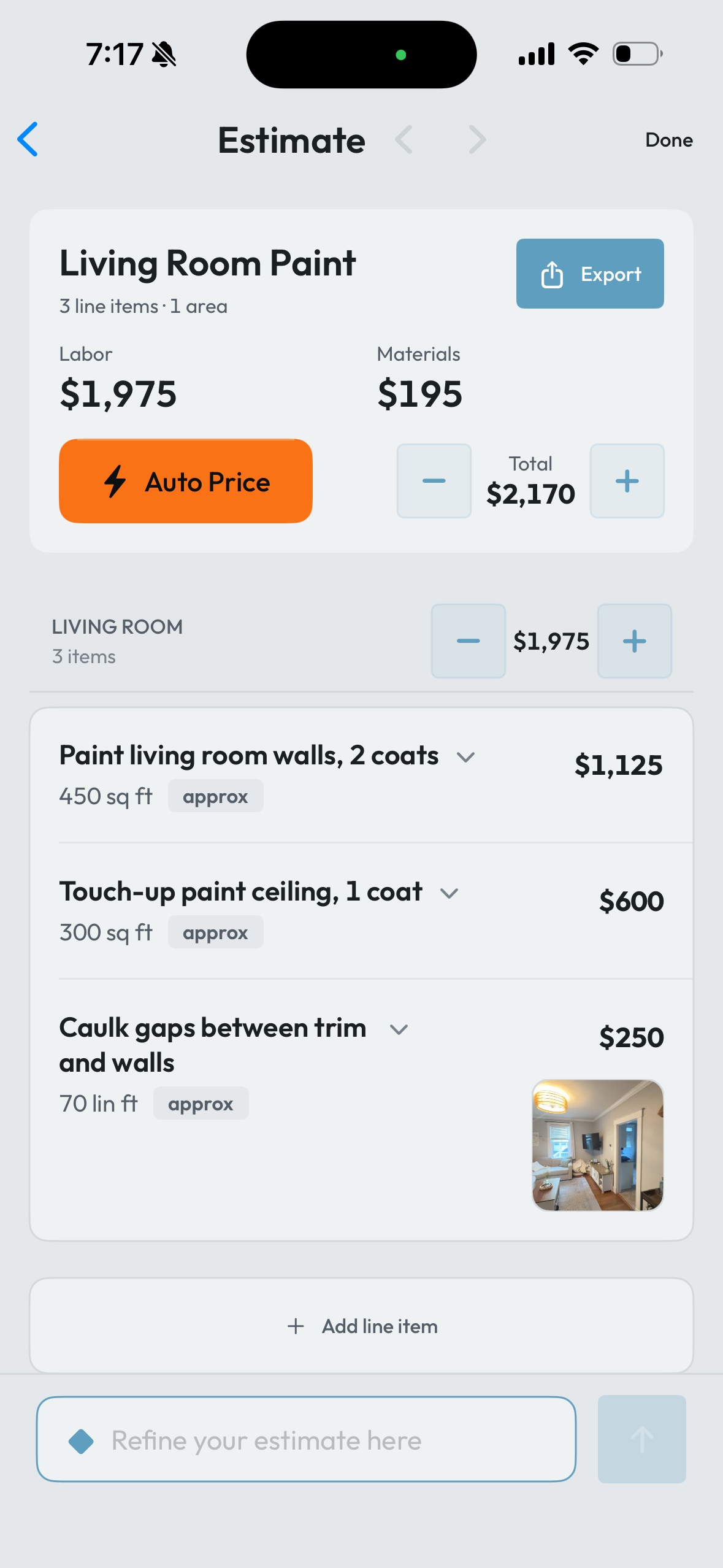
Raken is centered on field reporting and workforce records. CompanyCam is centered on jobsite photos. Handoff is centered on estimates and sales documents. RenoFriend combines a narrower set of those workflows around the renovation walkthrough, crew update, and client link.
This is a comparison written by RenoFriend, so our incentive is obvious. Every competitor claim below is tied to current first-party documentation, and we only mark a capability when those materials support it.
The comparison at a glance
| Workflow | RenoFriend | Raken | CompanyCam | Handoff |
|---|---|---|---|---|
| Daily reports or logs | ✓ | ✓ | ✓ | ✓ on Pro |
| Crew report without app/account | ✓ | Limited | Limited | — |
| Crew scheduling | ✓ week/month blocks for crew (no account) and teammates | Not evaluated | Not evaluated | Not evaluated |
| Scheduled SMS or WhatsApp report request | ✓ | — | — | — |
| Spanish narration to English report | ✓ | — | Limited on Scale | — |
| Project photo capture | ✓ | ✓ | ✓ | ✓ |
| Phone LiDAR measurement | ✓ | — | Photo measurement only on Scale | — |
| Custom pricing catalog | ✓ | — | — | ✓ on Flex+ |
| JobTread connection | ✓ | — | ✓ | Limited to CSV transfer |
| Export formats (client share, PDF with photos, CSV, Google Docs) | ✓ all four | Not evaluated | Not evaluated | Not evaluated |
| Month-to-month starting price | $89 flat per company; unlimited office seats, crew and client links free | About $49 reported by Capterra; vendor quote required | $79 Core; 1–2 users | $149 Flex; 2 users |
RenoFriend vs Raken: field reporting
Raken’s strength is the structured daily report. Its daily reporting product covers work logs, manpower, notes, photos, safety, and other formal field records. For a larger field operation where the daily report itself is the main product decision, that focus matters.
RenoFriend’s field-report workflow is intentionally lighter for the crew. A contractor schedules a request; the crew member opens an SMS or WhatsApp link, records the update, and submits without a RenoFriend account. Narration and evidence stay attached to the project. Each request link carries its own preview artwork, so it unfurls in SMS or WhatsApp with project context instead of a bare URL. A contractor can also attach an optional per-report bonus, and the link's preview card shows the reward before the crew member opens it. We walk through that flow step by step in field reports without a crew app.
Raken does document no-login workers, but its roles documentation limits that flow to supervisor-tracked time and timecard approval. That is not the same as submitting a complete narrative crew report without an app or account.
Raken also documents push reminders and email notifications. We did not find current first-party documentation for scheduled SMS or WhatsApp crew-report requests or an automatic Spanish-narration-to-English-report workflow. Raken may have adjacent capabilities; they are not counted here as exact matches.
Choose Raken when
- Formal daily reporting and workforce records are the main purchase.
- You need a mature construction reporting product across many roles and projects.
- Your team is comfortable using the Raken reporter workflow.
Choose RenoFriend when
- The crew should report through a link without another account.
- The same project also needs walkthrough-based planning, estimates, photos, and a client page.
- Residential renovation simplicity matters more than a broad enterprise field suite.
RenoFriend vs CompanyCam: jobsite photos
CompanyCam is the clearest photo specialist in this group. Its current plan guide lists unlimited photos, GPS and timestamps, projects, tags, annotations, and search. It also documents a native JobTread integration on current plans.
CompanyCam can share selected photos through Galleries and live Timelines on all current plans without requiring a client account. Its separate Guest Access feature can let outside participants contribute photos and comments on eligible plans.
CompanyCam also documents a narrated Walkthrough Page that combines spoken notes and photos. It is a meaningful adjacent workflow. The difference is that RenoFriend schedules a specific no-account crew-report link and structures progress, next work, blockers, and evidence around that request.
CompanyCam’s translation feature supports selected tasks, comments, and conversations between English and Spanish on Scale. User-generated reports remain in their original language, while shared Pages offer a manual English/Spanish toggle. Its LiDAR feature provides approximate measurements on supported devices and Scale. We classify that as a photo-measurement tool, not an automatically measured Scope of Work. For what phone LiDAR can and cannot deliver on a jobsite, see our iPhone LiDAR accuracy guide.
Choose CompanyCam when
- Photo organization is the main operating system your team needs.
- You want mature visual documentation and a current native JobTread integration.
- Unlimited photo capture matters more than combined estimating and client-signing workflows.
Choose RenoFriend when
- You need scheduled no-account crew reporting as well as photos.
- You want phone LiDAR-assisted Scopes of Work, estimates, and client acceptance on one flat $89 price that covers the whole office instead of per-user plans.
- Your priority is the path from first visit through estimate and client acceptance, not the deepest standalone photo product.
RenoFriend vs Handoff: estimates
Handoff’s current plans put estimates on Flex and above. Its catalog documentation lists one custom catalog on Flex and unlimited catalogs on Pro and above. Daily Logs are documented on Pro.
Handoff also documents in-app photo capture and project-organized files, mobile voice-and-photo Walkthrough Mode, and selective client-portal sharing of files and Daily Logs on the applicable tier. RenoFriend’s differentiators are the scheduled no-account crew request, the phone LiDAR workflow, and flat per-company pricing that never adds a seat charge—not a claim that Handoff cannot combine field evidence and client sharing.
One detail of the RenoFriend estimate path is worth naming because it changes what lands in front of the client. The Scope of Work is not final straight out of the walkthrough. After processing, the app asks targeted clarifying questions about anything the walkthrough left ambiguous — one card at a time, each with suggested answers — and a single round of answers finalizes the Scope. Ambiguity gets resolved before the document reaches the client, not after.
The important LiDAR correction is simple: Handoff’s current measured takeoff workflow operates on residential PDF plans up to 5,000 square feet. It is a Scale feature, with one trial credit on Pro. It should not receive a check for phone LiDAR-measured Scopes of Work.
Handoff also documents a CSV export/import workflow for JobTread. That is a useful path, but it is manual—not a native integration.
Choose Handoff when
- Estimate creation, proposals, invoices, and sales follow-up are the central need.
- PDF-plan takeoff on the higher tier fits the work you bid.
- The higher starting price is justified by the sales-document workflow.
Choose RenoFriend when
- The estimate should begin with an on-site phone walkthrough and LiDAR-assisted Scope of Work.
- The crew should receive a scheduled report link without another account.
- Phone LiDAR and one flat $89 price for the whole office matter more than PDF-plan takeoff and a broader sales suite.
Where Fieldwire, Procore, and Buildertrend fit
Some comparisons are category mistakes. Fieldwire’s Daily Report Forms are plan-centric field forms on business tiers. Procore’s Daily Log sits inside a much broader construction platform. Buildertrend combines residential project management, scheduling, and daily logs.
Those products can be the right answer when the buyer needs a full project-management platform. RenoFriend is not positioned as a Procore replacement. It is a focused field-capture and estimating layer for renovation contractors, with a JobTread integration for teams that already run the business there.
Pricing needs context
As of July 30, 2026, CompanyCam’s current plan guide listed month-to-month Core at $79, Crew at $149, and Scale at $249. Handoff’s current pricing listed month-to-month Flex at $149, Pro at $299, and Scale at $899. Raken requires a vendor quote; Capterra reports a roughly $49 monthly starting price, which may differ from a current Raken quote. RenoFriend is $89 per month flat per company: unlimited office seats, every user included, crew links and client links free. The first month is free, no credit card required.
The lowest sticker price is not automatically the lowest operating cost, and neither is the lowest entry price. CompanyCam’s $79 Core plan covers 1–2 users; a third user means Crew at $149. Handoff’s $149 Flex covers 2 users. A 3-person office on RenoFriend is still $89 — the flat price is the point, not the sticker. Count the seats you actually need, the workflows that still require another product, the time spent moving information, and the risk of buying an oversized platform nobody in the field uses.
A better way to decide
- Pick the one workflow creating the most repeated office work.
- Test that workflow with a real project and the least technical crew member.
- Inspect the final record, not just the capture screen.
- Check whether client access, integrations, translation, and measurements are on the quoted tier.
- Price the complete stack and actual seat count.
A good specialist is better than a broad product for the wrong workflow. The reason RenoFriend exists is that many renovation contractors do not want three specialists for the first visit, the daily update, and the client handoff.
Frequently asked questions
Is there a free plan?
No free tier, but the first month is free with no credit card required. After that RenoFriend is $89 per month flat per company. Crew report links and client share links are free on every plan, forever.
Does RenoFriend work with JobTread?
Yes. RenoFriend has a JobTread integration, so teams that run the business in JobTread can scan and scope in the field with RenoFriend and keep JobTread as the system of record.
Do crew members need accounts?
No. Crew members receive a scheduled SMS or WhatsApp link, record their update, and submit — no app download, no account, no seat charge. Spanish narration is translated to an English report automatically.
How is RenoFriend priced for a 5-person company?
$89 per month, same as for a 1-person company. Pricing is flat per company with unlimited office seats — every user is included, and crew links and client links are free.
How does that compare with CompanyCam or Handoff for a 3-person office?
As of July 30, 2026, CompanyCam’s Core plan covered 1–2 users at $79, so a third user meant Crew at $149 per month. Handoff’s entry Flex plan covered 2 users at $149. RenoFriend stays $89 flat at 3 users, 5 users, or 15.
Disclosure and trademarks: This comparison is published by RenoFriend. Raken, CompanyCam, Handoff, JobTread, Fieldwire, Procore, and Buildertrend are trademarks of their respective owners. RenoFriend is not affiliated with or endorsed by them. Features and published prices were reviewed from linked vendor materials on July 30, 2026; plans and availability may change. “Not publicly documented” means we found no current first-party documentation for the exact workflow, not that the vendor cannot provide it.