The integration has two deliberately different lanes: a finished crew report can move automatically into a Daily Log when its project mapping is connected and enabled, while a Scope of Work moves to the Job Budget only after the contractor taps Send.
That distinction is the center of the design. Routine reporting should require as little office work as possible. Pricing and project line items deserve an explicit review.
Why the products have different jobs
JobTread already provides project management, Daily Logs, job costing, documents, customer communication, and a broad Open API. RenoFriend is focused on the moments when useful project information is still trapped in a walkthrough, a crew member’s narration, or a camera roll.
The goal is not to build a second JobTread inside RenoFriend. It is to turn field evidence into a structured record and move the appropriate parts into the JobTread job the contractor already uses.
Lane one: field report to Daily Log
A contractor can schedule a report request for a crew member. The crew member opens a link, records the update, and submits it without creating a RenoFriend account. RenoFriend processes the report into a structured update. The crew side of that workflow is covered in field reports without another crew app.
The JobTread handoff starts only after that processing is complete. That completeness gate matters: a report should not look “synced” while its full video or photo set is still arriving.
A recent stair job shows the shape of it. The crew lead narrated the update in Spanish and attached 6 photos. The Daily Log received an English report: treads set, 11 of 14, with the photos and the source media still attached.
What the Daily Log receives
- The RenoFriend report status and project context.
- A progress summary, action items, blockers, and timestamped report sections.
- A narration excerpt and a link back to the source report.
- The complete walkthrough video and associated photos once the media set is ready.
That maps naturally to JobTread’s own Daily Logs, which support notes, photos, files, and videos. The purpose is a readable log in JobTread with the original evidence still attached—not a one-line pointer that forces the office to reconstruct the day elsewhere.
What happens after review
A report may be submitted, accepted, declined, marked as resubmission requested, and resubmitted. RenoFriend uses one report lineage so those states update the existing Daily Log while the mapping remains on the same JobTread job, rather than creating a new log for each state.
That prevents the most common integration failure: a technically successful sync that leaves the project manager with three records for one day and no clear current version.
Lane two: Scope of Work to Job Budget
A walkthrough can produce rooms, atomic tasks, quantities, measurements, notes, and linked evidence. RenoFriend calls that reviewed definition of the job the Scope of Work.
Those line items do not move merely because processing finished. The contractor reviews the work, makes corrections, and taps Send or Update. The send action—not a separate approval-status gate—starts the handoff.
| RenoFriend artifact | JobTread destination | Control point |
|---|---|---|
| Completed crew report | Daily Log with structured notes and evidence | Automatic after processing when the connected project mapping is enabled |
| Report review state | The existing mapped Daily Log | Updates follow the same report lineage |
| Scope of Work | Job Budget groups and line items | Contractor taps Send or Update |
| LiDAR measurements | Namespaced job parameters | Sent when the contractor taps Send or Update |
| Contractor pricing | Existing JobTread catalog and budget logic | JobTread remains authoritative |
First send
On the first Send, RenoFriend automatically creates and links a matching JobTread job. The contractor can later select or relink an existing job in integration settings. RenoFriend groups related work, sends atomic line items, and carries relevant quantities, measurements, notes, and evidence into the Job Budget.
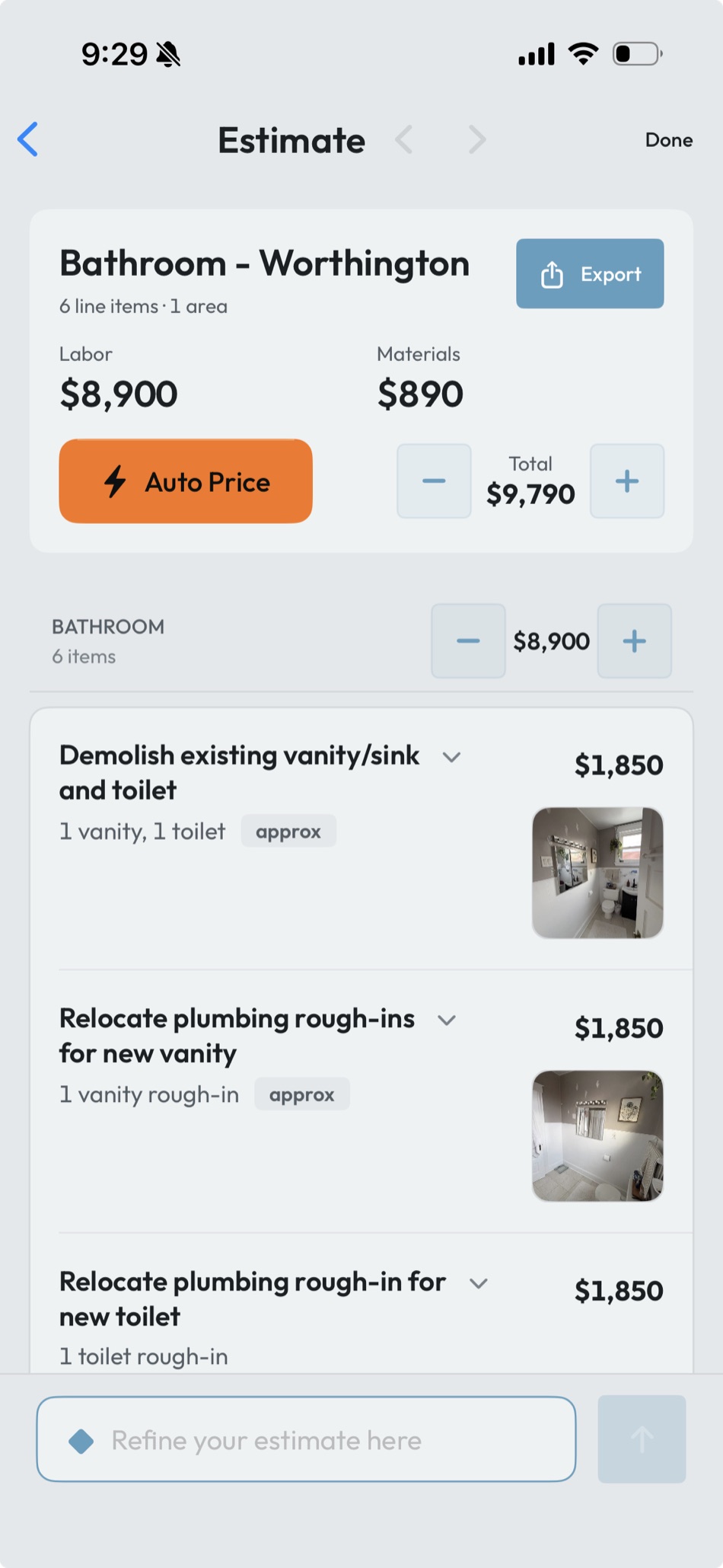
The screenshot above is a concrete example. A bathroom remodel walkthrough produced a six-line-item Scope of Work: demolition, plumbing rough-in relocations for the new vanity and toilet, and the new fixture installs. Priced in RenoFriend it totaled $9,790, split $8,900 labor and $890 materials. Those six lines, with their photos and quantities, are what land in the Job Budget when the contractor taps Send.
JobTread can store measurement parameters and reference them in Job Budget formulas; its documentation explains the broader measurement-to-budget workflow. RenoFriend namespaces its own parameters, which come from the LiDAR scan, so it does not have to replace unrelated job data.
Later updates
A sync is easy when nothing has changed on either side. Real projects are harder. A contractor may adjust a quantity, formula, description, attachment, or price in JobTread after the first send.
The integration rereads mapped JobTread rows and preserves contractor edits. When a RenoFriend line disappears from a later Scope of Work, the safer behavior is to mark it for review rather than silently delete the corresponding JobTread work.
“Designed to preserve” is intentional language. No integration should promise that conflicts are impossible. The useful contract is visible, reviewable behavior when both systems have changed.
Pricing stays with the contractor
RenoFriend can match Scope of Work items to the contractor’s existing catalog. It does not need to invent national pricing or overwrite a price the contractor changed in JobTread.
On an initial create, a matched line may inherit the existing JobTread catalog defaults. On later syncs, the integration never overwrites pricing the contractor has set in JobTread; a line that is still blank there may be gap-filled from the catalog’s defaults. Either way, JobTread’s pricing decisions remain authoritative.
This is also why the destination is the Job Budget, not a claim that RenoFriend replaces JobTread’s proposal and document workflow. JobTread remains the place where the contractor controls downstream documents, approvals, accounting, and job management.
What the integration does not do
- It does not send Scope of Work line items automatically after every walkthrough.
- It does not replace JobTread proposals, contracts, accounting, or project-management workflows.
- It does not intentionally delete contractor-edited Job Budget rows.
- Initial matched lines may inherit existing JobTread catalog defaults; later syncs never overwrite contractor-set pricing, though a line still blank in JobTread may be gap-filled from those defaults.
- It is not represented here as an official, certified, or marketplace partnership.
Connection and security
The integration uses JobTread’s grant-key connection flow. The credential is handled server-side rather than stored as a reusable secret in the contractor app. The user chooses the organization and mappings available through that connection.
JobTread documents both its API capabilities and the role of Daily Logs in the product. RenoFriend’s responsibility is narrower: use that access only for the jobs and actions the contractor selected, make failures visible, and retry safely without duplicating records.
The practical payoff
Without an integration, “we already use JobTread” can create more work: someone still has to copy a field update, download its media, recreate line items, and decide which record is current.
With the two-lane model, routine field evidence can arrive in Daily Logs automatically, while commercial decisions still stop for contractor review. RenoFriend automates the transcription and transport, not the contractor’s judgment. The cheapest way to evaluate it is to connect one active job and watch a single report cross.
Source note: JobTread product capabilities are linked to JobTread’s official documentation. RenoFriend behavior reflects the integration workflow reviewed on July 30, 2026.