The integration does one thing, deliberately: it turns a finished walkthrough into a draft budget in JobTread, shaped like the budgets your company already writes there. Nothing posts as final, nothing is priced from a national average, and nothing you have set in JobTread gets overwritten. You tap Send; that is the whole trigger.
Why the products have different jobs
JobTread already runs the business: budgets, job costing, documents, customer communication, and a broad Open API. Biltum is focused on the moment before all of that — the walkthrough, where the job is still trapped in your head, your narration, and your camera roll.
The goal is not a second JobTread inside Biltum. It is to get the walkthrough into the JobTread job you already run, looking like you built it there yourself.
Step one: the walkthrough
Open the project, start the scan, and talk. On an iPhone Pro the app runs a LiDAR scan while you walk; on any iPhone it records the video and your narration. Tap the camera button when a condition matters and the app snaps a still without stopping the capture. Say what stays and what changes, one room at a time.
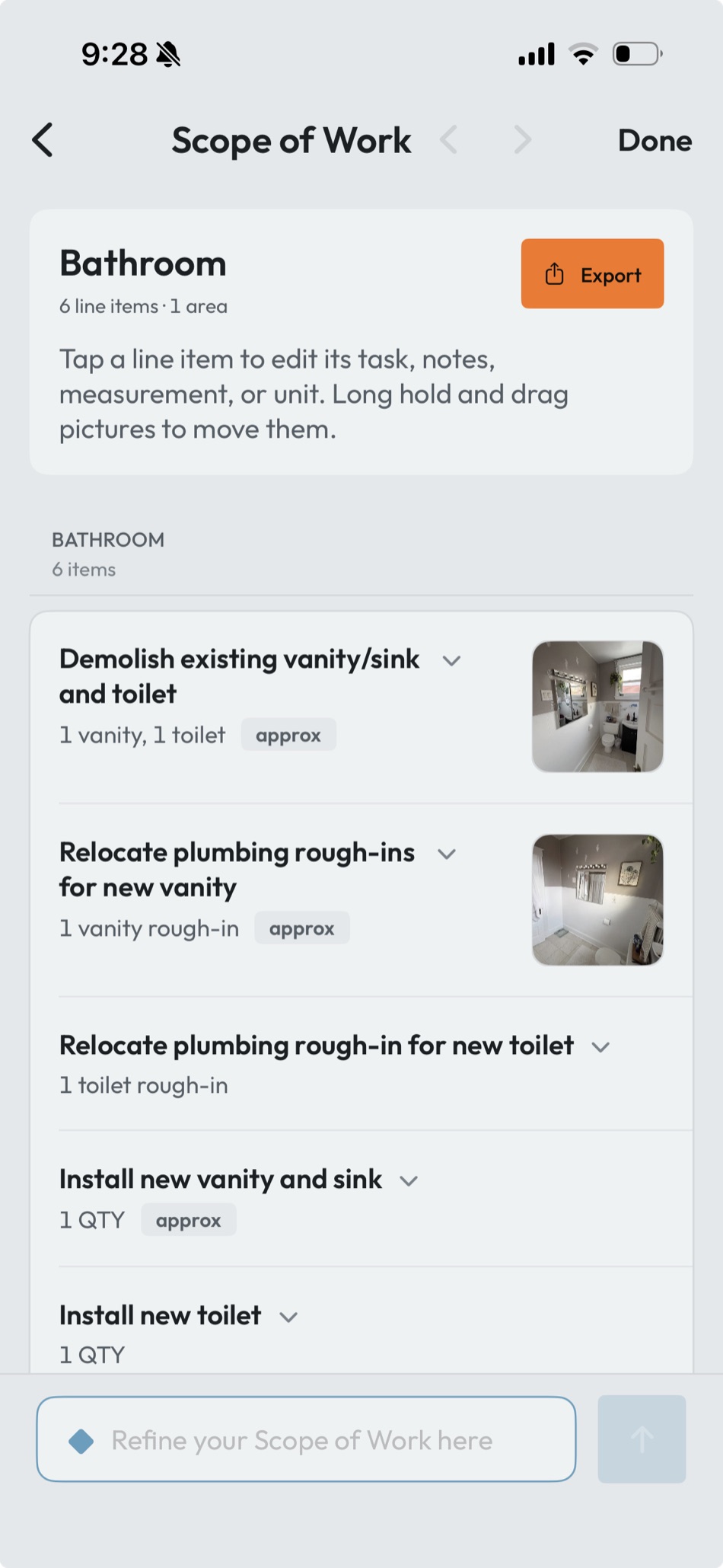
Biltum turns that into rooms with real measurements, your narrated decisions as line items, quantities, and the photos attached to the work they support. That reviewed, editable record is the Scope of Work — the middle step. Fix a quantity, cut a line you did not mean, add an exclusion. What you approve here is what becomes the budget.
Step two: Biltum reads your JobTread first
Before the first budget ever crosses, Biltum connects to your JobTread account and reads how your company actually builds jobs:
- Your past budgets — recent jobs, including their group structure and line items.
- Your cost groups and cost codes — what you call your phases and where lines live.
- Your catalog — the cost items you actually use, with their units and rates.
From that it learns your format: whether you organize by phase or by area, what you name things, how deep your nesting goes, which catalog items do the real work. This is a read, not a takeover — nothing in your account is modified while Biltum learns. The full mechanics are in how Biltum drafts your JobTread budget in your format.
Step three: one tap creates the draft budget
When you tap Send to JobTread, the Scope of Work and what Biltum learned about your account meet, and a draft budget is created on the JobTread job:
| Part of the draft budget | Where it comes from |
|---|---|
| Cost groups and names | Your learned format — the way your past budgets are organized and labeled |
| Line items | The reviewed Scope of Work, matched to your existing catalog items where a real match exists |
| Quantities and measurements | The walkthrough — walls 450 SF, ceiling 300 SF, caulk 70 LF, from the scan rather than a guess |
| Prices | Your own JobTread catalog and rates — matched lines carry your pricing; unmatched lines stay open for your estimator |
On a living-room repaint that reads, in your own cost groups: wall paint labor 450 SF at $1,125, ceiling 300 SF at $600, caulk 70 LF at $250, wall paint 3 gal at $210, ceiling paint 1 gal at $40, caulk 3 tubes at $15 — $2,240, priced with your numbers. On the first send Biltum creates and links the JobTread job for you; you can point a scope at an existing job instead from the app.
It lands as a draft. Your estimator opens it in JobTread, reviews the lines and the numbers, and finishes it the way they finish every budget. Nothing is presented to a customer until you do that.
Photos and video land on the job
The walkthrough photos and video upload to the JobTread job’s Files alongside the budget, so the evidence sits next to the numbers instead of in someone’s camera roll. The floor plan and 3D model from the scan travel separately: export them as PDF, DXF, DWG or USDZ, or share the read-only web link with anyone who needs to see the space.
What the integration does not do
- It does not post anything as final. The destination is a draft budget, for your estimator to finish.
- It does not send anything on its own — a scope moves only when you tap Send.
- It does not change your catalog, your cost groups, or your past budgets. Where it reads, it only reads.
- It does not price from national averages. Every number in the draft traces to your own catalog and rates.
- It does not overwrite prices you have set in JobTread, or delete rows you have edited there.
- It does not replace JobTread proposals, contracts, accounting, or project management.
- It is not an official, certified, or marketplace partnership. Biltum works with JobTread.
Connection and security
You connect once, from the app, with a JobTread grant key. The credential is handled server-side rather than stored as a reusable secret on the phone, and access is used only for the jobs and actions you trigger. JobTread documents its API capabilities; Biltum’s responsibility is to use that access narrowly, make failures visible, and retry safely without duplicating records.
The practical payoff
Without the integration, “we already use JobTread” means someone still rebuilds the walkthrough by hand: retyping line items, guessing quantities, restructuring everything into the company format. With it, the walkthrough is the first draft — in your structure, speaking your catalog, priced with your numbers, with the photos already on the job. The cheapest way to evaluate it is to install the app, connect your account, walk one job, and read the draft that lands.
Source note: JobTread product capabilities are linked to JobTread’s official documentation. The workflow, draft-budget and media behavior above reflects the Biltum app as verified on September 29, 2026; the sync-preservation rules (no overwrites, no silent deletes) were verified September 7, 2026. For the learning mechanics in depth, see how Biltum drafts your JobTread budget in your format.